


Secure Your Digital Life: A Step-by-Step Guide to Downloading Your Facebook Data
POLICY WIRE — Albuquerque, N.M. — A recent survey by NordPass revealed that over half of all internet users have experienced losing access to an online account due to forgotten passwords. In an age...

POLICY WIRE — Albuquerque, N.M. — A recent survey by NordPass revealed that over half of all internet users have experienced losing access to an online account due to forgotten passwords.
In an age where digital footprints are extensive, safeguarding personal data has become paramount. For millions of users on platforms like Facebook, the ability to archive one’s digital life provides a crucial layer of security against unforeseen account issues or platform changes.
Why Download Your Facebook Information?
Imagine losing years of cherished photographs, important contacts, and personal memories stored on a social media platform. Facebook provides a robust feature allowing individuals to download virtually all their personal information, offering peace of mind and control over their digital assets.
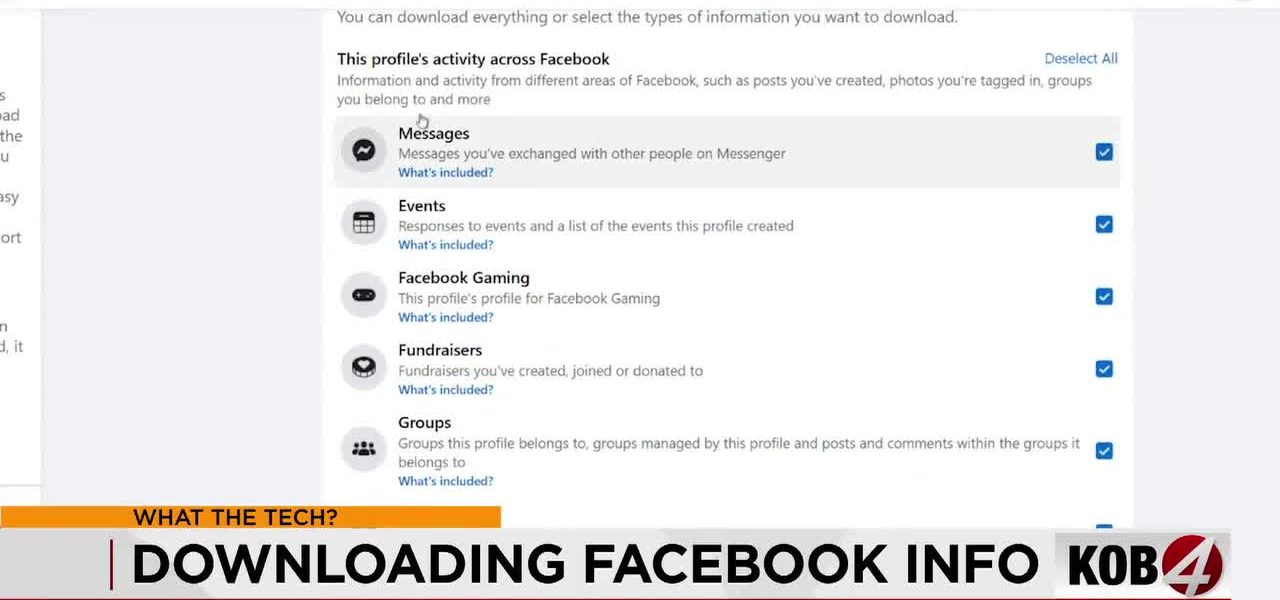
This comprehensive download includes a wide array of data: your uploaded pictures, entire contact lists, significant life events recorded as memories, and even details about the groups you are a part of. It essentially covers everything you’ve ever interacted with or uploaded to the platform.
Read More: Former UFC Star Darren Till Slams Dana White Over AI Promos and “Ego” in MMA Production
Step-by-Step: Accessing Your Data Archive
To initiate this process, navigate to your Facebook Settings. Within the settings menu, locate and select the option labeled “Your Facebook Information.” Here, you will find various tools for managing your data.
Once inside this section, you can specify exactly what categories of information you wish to save. It is generally advisable to download your complete profile details and all content you have engaged with, ensuring a full backup of your online history.
“Downloading your digital history ensures that your memories and interactions remain accessible, regardless of changes to online platforms.”
📄 POLICY WIRE WHITEPAPER PUBLISHED: PAKISTAN'S NATIONAL SECURITY POLICY PRIORITIES
👉 READ BY CLICKING HERE
Understanding Data Formats: HTML vs. JSON
Your data can typically be downloaded in two primary formats. The first, HTML (HyperText Markup Language), is easily viewable in any web browser and presents your information in a user-friendly, organized structure, making it ideal for casual review.
For those interested in more advanced data management or analysis, the platform also offers data in JSON (JavaScript Object Notation) format. While the technical specifics of JSON are not essential for the average user, downloading this file ensures maximum compatibility for potential future use or migration to other services.
Read More: Germany Halves 2026 Economic Growth Forecast Amid Iran War, Soaring Energy Costs
Important Considerations After Requesting Data
The time required to generate your download file can vary significantly, depending on the sheer volume of content you have posted and uploaded over the years. Rest assured, Facebook will send a notification once your archive is prepared, along with a secure link from Meta for retrieval.
Crucially, act promptly upon receiving this download link. These links are time-sensitive and typically expire within a few days. Failure to download the file within this window will necessitate restarting the entire data request procedure.
While this process secures your personal data offline, it’s important to note that the downloaded archive cannot be directly imported into a new Facebook account. However, having this complete backup ensures your digital memories and interactions are permanently preserved on your local computer.